
Omarchy · Quickshell plugin
Run Bootable from the Omarchy bar
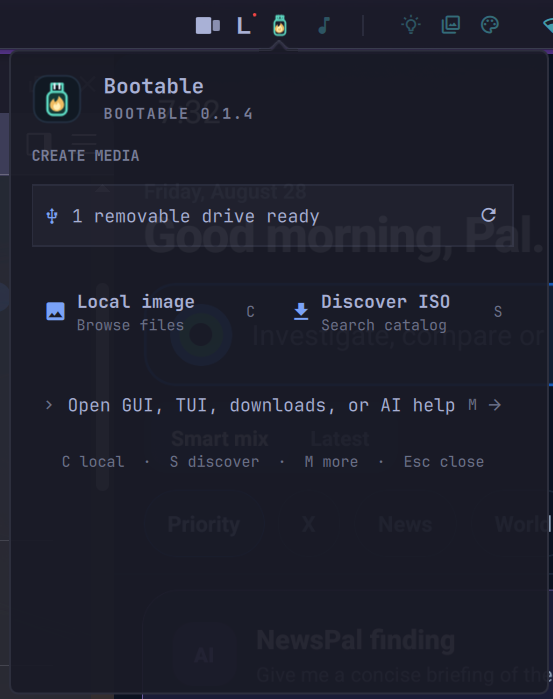
Search the image catalog, choose a local image, review removable drives, and follow progress without leaving the bar.
Compact media workflow
Requirements
- Omarchy 4 or newer with the Quickshell plugin API.
- Bootable 0.1.4 or newer with its CLI client modes, root-owned write helper, and Polkit policy for the complete in-panel workflow.
bootable-desktopis optional and enables the full GUI shortcut.
Install Bootable before the plugin. Use a compatible package from the Bootable releases page. The plugin checks the CLI and helper without changing them.
Install and enable
Run this as your normal user:
omarchy plugin add https://github.com/debpalash/omarchy-bootable.git --enable --yesThe Bootable icon appears in the right side of the Omarchy bar. Click it to open the panel; no shell restart is normally required.
Use the panel
- Press
Cto choose a local image orSto search Bootable's distribution catalog. - Select an image or release and wait for its inspection or verified download.
- Select an eligible removable drive. Internal, system, read-only, and otherwise blocked disks cannot be chosen.
- Review Bootable's exact erase plan and acknowledge it separately before writing.
- Follow preparation, writing, syncing, and verification progress in the panel.
Press R to refresh drives, G for the full GUI, T for the TUI, or A for AI troubleshooting.
Write safety
The plugin delegates inspection, drive discovery, planning, writing, and verification to Bootable. It never auto-selects a target. Bootable checks the selected drive again before its fixed helper writes, and an active write continues if the panel closes.
Update or remove
# Update
omarchy plugin update io.github.debpalash.bootable

# Remove
omarchy plugin remove io.github.debpalash.bootable
Removal deletes the Omarchy-managed plugin checkout and settings. It does not remove Bootable or change disks and system packages.
Read the plugin documentation
See the full shortcut list, dependency notes, permissions, and source.
Open the plugin repository